EcoSmartSDG 12 · Responsible Consumption and Production

SDG 12 · Responsible Consumption and Production

EcoSmart

A waste management and recycling guide for schools and communities. Find the right bin, plan what to reuse, and test your sorting skills.

Surface model

Scenario 1 – Improper Waste Management

Waste action guides

Choose a topic to find an action for home or school.

5 guides

Separate biodegradable and non-biodegradable wasteSort

Separate a banana peel from its wrapper. Check whether your school collects fruit scraps for compost.

Use proper trash binsSort

Read the bin label and your collector’s accepted-items list. Keep food and liquid out of dry recycling.

Remove any sticker. Check whether the school accepts fruit scraps for composting.

Reduce plastic usageReduce

Pack a refillable bottle or washable container when it replaces a disposable one.

Reuse and recycle materialsReuse

Use the blank side of paper for notes. When both sides are used, check whether your collector accepts it.

Encourage others to practice proper waste managementShare

Show a classmate how to check a bin label. Ask your family to choose one disposable item to replace this week.

Reuse planner

How many single-use items could you avoid?

Your plan

Calculate to see your estimate.

Count each disposable item only when a reusable alternative replaces it.

CIS 1102 / CIS 1104

Research portfolio

HCI Activity – November 17 · P. M. A. B. and I. K. B. H.

1.0 System Overview & SDG Alignment

1.1 Storyline and relevance

Scenario 1 – Improper Waste Management

Our scenario focuses on improper waste disposal in schools and communities. Many people do not practice proper waste segregation, which causes pollution. Through our website, EcoSmart, we aim to teach people about waste segregation, recycling, and reusing materials.

Proper waste management is important because it helps reduce pollution and keeps our environment clean. Everyone produces waste daily, so we should learn how to dispose of it properly.

As students, friends, and family members, we are responsible for keeping our surroundings clean. We can influence others by practicing proper waste disposal and encouraging them to do the same.

1.2 Audience and core tasks

Task walkthroughs
UserTask and success conditionDifficulty
Student after lunchSelect a bottle, peel or paper in the sorter. Identify the local rule to check.Moderate: local collection varies.
Family memberUse the action guides to choose a washable substitute for one disposable item.Low: one concrete choice.
School club volunteerEnter items replaced per day and days of reuse, then explain the estimated total.Moderate: distinguish a plan from a measured count.
ClassmatesComplete five sorting decisions and review feedback together.Low: immediate explanations.

1.3 SDG 12 – Responsible Consumption and Production

UN target 12.5 addresses waste prevention, reduction, recycling and reuse. Our planner helps students try out a prevention habit. Replacing two disposable items on each of five school days would avoid ten items if the plan is followed. A class could check the estimate by tallying what was actually replaced.

Target 12.8 concerns information and awareness for sustainable lifestyles. The guide puts a familiar item beside a decision a learner can make today. Knowing a peel is biodegradable starts the discussion; finding out whether the school accepts it for composting completes the local decision. Sharing this process with friends and family extends the lesson beyond school.
2.0 Computing & Systems Architecture Analysis

2.1 Data, information and knowledge

Reuse planner
StageExampleInterpretation
Data2 items per day; 5 daysUser estimates how often a reusable option will replace a disposable item.
Information2 × 5 = 10 itemsExpected count over the selected period.
KnowledgeOne item per day for 5 days gives 5 items.A family can compare two realistic plans. Counts alone do not measure material weight.

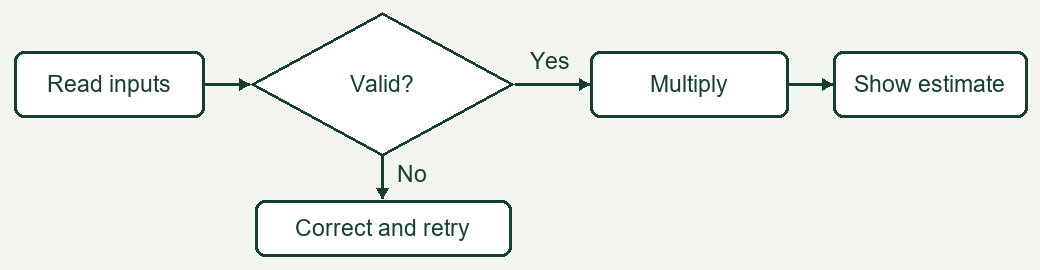
2.2 Algorithm and flowchart

READ items per day (0..100), days (1..365)
IF either value is missing, fractional or out of range
    Request correction and stop
ELSE display items per day * days with the unit "items"
Read inputs. Valid entries lead to calculation and display. Invalid entries require correction and resubmission.
Reuse estimate and correction path

2.3 Number systems

Ten avoided items is 00001010 in 8-bit binary and 0A in hexadecimal. A change from ten to five items is −5. Its signed 8-bit two’s complement is 11111011 (FB in hexadecimal). The form uses nonnegative integers for counts.

2.4 Hardware and peripherals

Client and optional school host
ComponentClient deviceSchool web host (proposed)
InternalCPU executes the formula. RAM holds the open page. Local storage contains the extracted files.CPU serves requests, RAM buffers responses, and an SSD stores the release.
External and I/OKeyboard or touch is input. Screen, Braille display or speech output presents the result.A network interface sends files to clients. An administrator can use a keyboard and display for maintenance.

2.5 Software stack

A desktop or mobile operating system manages memory and input devices. The browser parses HTML, lays out the CSS grid and runs JavaScript. An archive utility extracts the submission. A text editor supports maintenance, and a spreadsheet can independently check example calculations. An optional Linux host with Nginx could serve the same files.

2.6 Storage strategy

For five guides, distributing checked text with the static page is simple and works offline. As more editors and schools contribute, separate files make it easy to duplicate a topic or lose track of a source. A proposed relational design would support shared topics and multiple reviewed sources per guide.

Proposed guide catalog
RelationKeys and attributesIntegrity rule
Topictopic_id (PK), nameEach topic name is unique.
Guideguide_id (PK), topic_id (FK), title, bodyEach guide belongs to an existing topic.
GuideSourcesource_id (PK), guide_id (FK), url, reviewed_onEach source identifies its guide and review date.

One Topic can have many Guides. One Guide can have many GuideSource records. A transaction can update a guide and its references together. The shipped prototype keeps calculator entries in page memory and has no database connection.

2.7 Client, server and network

Phone or laptop -> Wi-Fi access point -> school router -> HTTPS web host
Browser  <-  HTML, CSS, script and diagram  <-  static file service

On a hosted site the browser resolves the host name, establishes a secure connection, and requests index.html with HTTP GET. After receiving the HTML it requests style.css, app.js and the diagram. HTTPS uses TLS to protect data in transit. A classroom access point forms the center of a local star. The downloaded version reads the assets from disk and the Calculate button sends no network request.

Native controls and ordinary HTML support current Edge, Chrome, Firefox and Safari as design targets. A future catalog service could answer GET /api/guides with reviewed guide records in JSON. This is a proposed endpoint. Browser and assistive-technology coverage should be checked on school devices.

3.0 HCI Evaluation, Security & Future Technologies

3.1 Usability and accessibility

Learnability depends on using familiar item names. Efficiency improves when the selected item and its disposal advice appear together. For error recovery, the planner rejects fractional counts and out-of-range days. The quiz explains each answer immediately. These findings come from design inspection; participant success and satisfaction still require observation.

WCAG 2.1 review
DimensionDesign choiceEvaluation task
VisualText accompanies each answer. The diagram has a text alternative.Check contrast and narrow-screen reflow (1.4.3, 1.4.10).
AuditoryAll guidance and quiz explanations are written.Complete the activities with the sound off.
MotorNative controls, visible focus, and a reduced-motion option support keyboard use.Reach the sorter and finish the quiz with the keyboard (2.1.1, 2.4.7).
CognitiveField labels specify counts and days. Bin guidance uses concrete examples.Ask a learner to explain the estimate and identify which local rule to check (3.3.2).

3.2 Security, privacy and ethics

The tools process choices in the browser. They request no student names, set no cookies and submit no responses. The host may record access logs. For a school pilot, explain any collection purpose, limit access and define retention before collecting feedback. Sections 11 and 20 of the Philippine Data Privacy Act address processing principles and safeguards. Use HTTPS and restrict access to deployment settings.

3.3 Analytics and recommendations

A future class pilot could compare anonymous counts of correct sorting decisions before and after using the guide. Include the number of participants with any percentage. A teacher could review AI-assisted plain-language drafts against the school’s collection list before publishing.

High priority: verify the guide with the school collector and record the date. Medium: test with a keyboard, screen reader and narrow phone. Low: compare two versions of a frequently misunderstood bin label using the same sample items.

HCI Activity – November 17

Action items

1. Separate biodegradable and non-biodegradable waste. Separate a banana peel from its wrapper. Check whether your school collects fruit scraps for compost.

2. Use proper trash bins. Read the bin label and your collector’s accepted-items list. Keep food and liquid out of dry recycling.

3. Reduce plastic usage. Pack a refillable bottle or washable container when it replaces a disposable one.

4. Reuse and recycle materials. Use the blank side of paper for notes. When both sides are used, check whether your collector accepts it.

5. Encourage others to practice proper waste management. Show a classmate how to check a bin label. Ask your family to choose one disposable item to replace this week.

Individual Learning Reflection

Reflection 1

I learned that small actions can help protect the environment. Working with my partner was enjoyable, although organizing our ideas was challenging. This activity taught me to be more responsible with waste.

Reflection 2

I learned that protecting the environment is everyone’s responsibility. Creating ideas for our website helped me become more aware of environmental problems and possible solutions.

Sources

United Nations, SDG 12 targets

W3C, WCAG 2.1

National Privacy Commission, RA 10173